


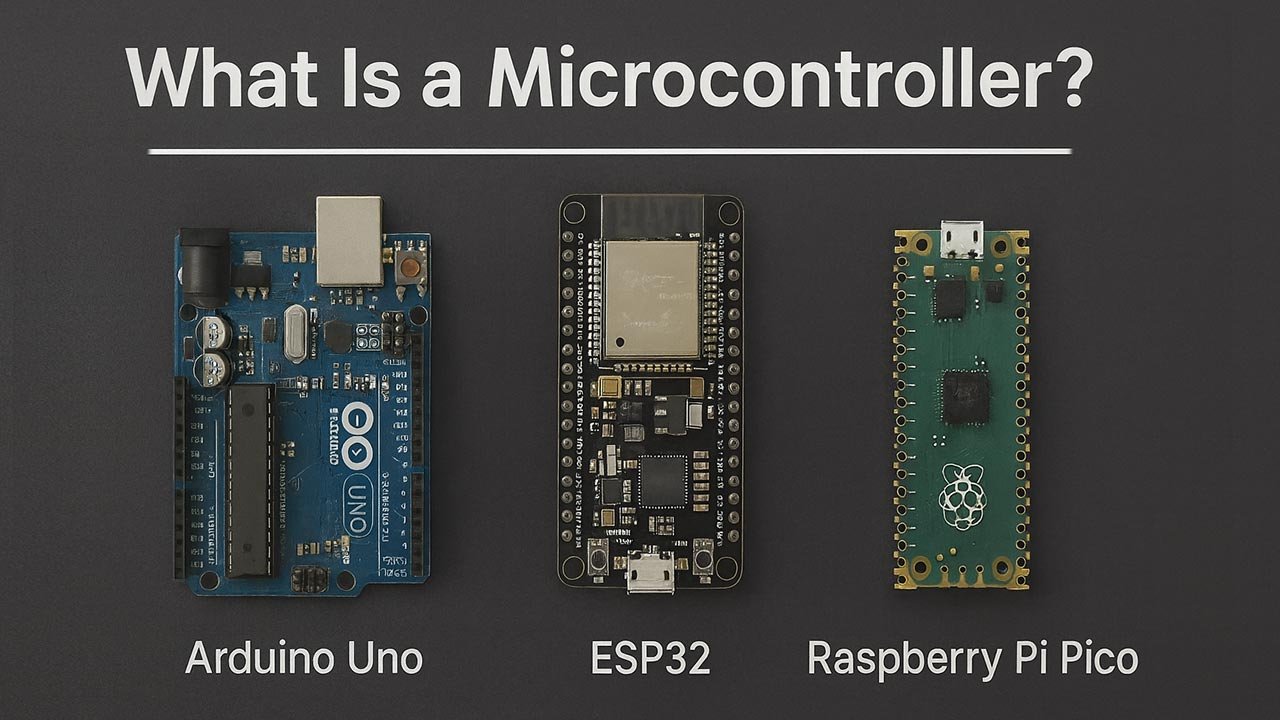
What Is a Microcontroller? (Arduino, ESP32, Pi Pico Comparison)
Microcontrollers sit at the crossroads of electronics and software. They’re the tiny, powerful brains behind everyday devices—from smart thermostats to drones to wearable health trackers. If you’ve learned the basics of circuits, sensors, and electrical components and now feel ready to bring things to life with code, microcontrollers are the natural next step. In this article, we’ll break down what a microcontroller is, how it compares to a microprocessor, and how popular beginner-friendly boards like the Arduino UNO, ESP32, and Raspberry Pi Pico stack up.
Table of Contents
- What Is a Microcontroller?
- Transitioning from Basic Electronics to Programming
- Arduino UNO Overview
- ESP32 Overview
- Raspberry Pi Pico Overview
- Side-by-Side Comparison
- Which Microcontroller Should You Choose?
- Top 5 Frequently Asked Questions
- Final Thoughts
- Resources
What Is a Microcontroller?
A microcontroller (MCU) is a compact integrated circuit that includes a processor, memory, and input/output peripherals—all on a single chip. Its purpose is simple: read inputs, process logic, and control outputs.
Think of a microcontroller as a self-contained automation module. Once programmed, it can run independently—no operating system, no file system, and no complex hardware required.
Common examples of microcontroller-driven devices include:
- Keyboards and mice
- Washing machines
- Smart door locks
- Car engine control units
- 3D printers
- Remote controls
Microcontrollers excel where efficiency, determinism, and low cost matter.
Microcontroller vs. Microprocessor
Although the terms sound similar, their roles differ significantly:
| Feature | Microcontroller | Microprocessor |
|---|---|---|
| Components | CPU + RAM + Flash + I/O on one chip | CPU only |
| Best For | Embedded devices, automation | Full computers (laptops, servers) |
| Power Consumption | Very low | Higher |
| Requires OS? | No | Typically yes |
| Example | Arduino, ESP32 | Intel i7, Apple M2 |
A microprocessor needs additional chips and usually an operating system. A microcontroller is the system.
Why Microcontrollers Matter in Innovation
Modern innovation depends heavily on embedded intelligence. According to industry research, over 29 billion IoT devices are expected to be connected globally by 2030, and the majority will rely on microcontrollers for local processing and power efficiency.
Microcontrollers:
- Make products smarter without increasing cost
- Enable edge computing (processing data locally instead of in the cloud)
- Reduce latency for safety-critical tasks
- Support rapid prototyping
For innovators, designers, and entrepreneurs, microcontrollers unlock the ability to turn a physical idea into a working interactive prototype in days—not months.
Transitioning from Basic Electronics to Programming
If you’ve been building circuits with LEDs, resistors, sensors, or breadboards, microcontrollers help you take the leap from passive components to active, responsive systems.
Why Microcontrollers Are the Perfect Bridge
- They make electronics interactive
Instead of turning on an LED manually, you can tell it to blink every 300 ms. - They simplify complex tasks
Reading sensor values becomes a line of code, not an analog circuit. - They teach real programming concepts
Variables, loops, functions, and logic become visible through physical behavior. - They use beginner-friendly languages
- Arduino → simplified C++
- ESP32 → Arduino, MicroPython, ESP-IDF (C)
- Pi Pico → MicroPython or C/C++ SDK
- They build intuition for hardware optimization
You learn why timing matters, how power consumption works, and what interrupts are.
Arduino UNO Overview
The Arduino UNO is the most iconic beginner microcontroller board—built around the ATmega328P 8-bit MCU.
Key Specs
- 16 MHz clock speed
- 2 KB SRAM
- 32 KB flash storage
- 14 digital I/O pins
- 6 analog inputs
- Operating voltage: 5V
Strengths
- Most beginner friendly system available
- Massive community support and documentation
- Thousands of plug-and-play shields and modules
- Simple programming environment (Arduino IDE)
- Very stable and predictable for basic automation
Perfect for:
- Learning core electronics
- Simple robotics
- LED projects
- Introductory sensor experimentation
Limitations
- Limited RAM and clock speed
- No built-in Wi-Fi or Bluetooth
- Not designed for advanced data processing
ESP32 Overview
The ESP32 is a high-performance, feature-rich microcontroller widely used in IoT and connected device development.
Key Specs
- Dual-core processor up to 240 MHz
- 520 KB SRAM
- Built-in Wi-Fi + Bluetooth
- Multiple ADC, DAC, PWM channels
- Deep-sleep power modes
Strengths
- The best price-to-performance ratio in the hobby world
- Built-in wireless connectivity
- Ideal for smart home, IoT, and AI-at-the-edge applications
- Supports Arduino, MicroPython, ESP-IDF
- Strong community and commercial adoption
Common uses:
- Home automation
- Wearables
- Wireless robotics
- Data logging with cloud integration
Limitations
- More complex than Arduino for beginners
- Requires careful power management
- Wireless stack increases power consumption
Raspberry Pi Pico Overview
Powered by the RP2040 chip, the Raspberry Pi Pico delivers impressive performance at a very low price.
Key Specs
- Dual-core ARM Cortex-M0+ at 133 MHz
- 264 KB RAM
- 2 MB onboard flash
- 26 GPIO pins
- Programmable I/O (PIO) for custom interfaces
Strengths
- Extremely affordable
- Highly flexible hardware thanks to PIO
- Great for intermediate makers and embedded engineers
- Excellent MicroPython support
- Fast I/O for demanding real-time tasks
Typical applications:
- Custom communication protocols
- Timing-critical robotics control
- Sensor hubs
- Education and prototyping
Limitations
- No built-in Wi-Fi (unless using Pico W)
- Fewer beginner tutorials than Arduino
- PIO requires more advanced understanding
Side-by-Side Comparison
| Feature | Arduino UNO | ESP32 | Raspberry Pi Pico |
|---|---|---|---|
| CPU | 8-bit, 16 MHz | Dual-core 240 MHz | Dual-core 133 MHz |
| RAM | 2 KB | 520 KB | 264 KB |
| Connectivity | None | Wi-Fi + BT | None (Pico W: Wi-Fi) |
| Ease of Use | Easiest | Moderate | Moderate |
| Best For | Beginners | IoT | Real-time tasks |
| Language Support | Arduino (C++) | Arduino, MicroPython, C | MicroPython, C/C++ |
| Price | Low | Low | Very low |
Which Microcontroller Should You Choose?
Choose Arduino UNO if:
- You’re just starting
- You want the simplest learning curve
- You’re working on LED, button, motor, or sensor basics
- You want guaranteed stability
Choose ESP32 if:
- You need Wi-Fi or Bluetooth
- You’re building smart devices
- You want advanced performance
- You want incredible power per dollar
Choose Raspberry Pi Pico if:
- You enjoy deeper hardware experimentation
- You need fast I/O or custom peripheral control
- You want a cheap but powerful board
- You prefer MicroPython
Top 5 Frequently Asked Questions
Final Thoughts
Microcontrollers are the perfect next step once you understand basic electronics. They add logic, automation, and intelligence to otherwise passive circuits, allowing you to build everything from smart sensors to full IoT ecosystems. Each board—Arduino, ESP32, and Pi Pico—has its own strengths, but all of them teach essential skills for modern innovation: embedded programming, hardware interaction, and system-level thinking.
The most important takeaway:
Microcontrollers transform ideas into interactive, functional prototypes. They are the gateway to both embedded engineering and creative technology development.
Leave A Comment