


What Is Home Assistant?
Home Assistant is an open-source home automation platform that runs locally on your own hardware and unifies smart devices, automations, and data under your control. This article explains what Home Assistant is, how it works, where it fits in the smart home ecosystem, and why more advanced users are choosing it over closed, cloud-heavy platforms.
Table of Contents
- What Is Home Assistant? Overview
- How Home Assistant Works
- Installation Options
- Core Features and Capabilities
- Benefits of Home Assistant
- Common Use Cases
- Privacy and Security Model
- Home Assistant vs. Commercial Platforms
- Who Should Use Home Assistant?
- Top 5 Frequently Asked Questions
- Final Thoughts
- Resources
What Is Home Assistant? Overview
Home Assistant is an open-source home automation platform designed to be the central brain of your smart home. Instead of relying on multiple brand-specific apps and cloud services, you run Home Assistant on a local device such as a Raspberry Pi, mini PC, server, or virtual machine. It then connects to your lights, sensors, switches, thermostats, cameras, media players, and more, turning them into a single coherent system.
At its core, Home Assistant is built for three strategic goals:
- Local control whenever possible, to reduce latency and increase reliability.
- Vendor independence, so you can combine devices from many manufacturers without lock-in.
- Privacy by design, so your household data stays in your home unless you explicitly choose to expose it.
Because the project is open source, it evolves rapidly. Engineers, hobbyists, and device manufacturers contribute new integrations, bug fixes, and features. That community-driven model is one reason it has become a favorite platform for technically inclined users and smart home professionals.
How Home Assistant Works
Home Assistant acts as an event-driven automation engine. Every connected device exposes states and services. States are things like “light is on”, “temperature is 72°F”, or “motion detected”. Services are actions the system can perform, such as “turn on light”, “set thermostat”, or “lock door”.
Home Assistant continuously listens for events from devices and systems. When events match the conditions you define in automations, Home Assistant executes the corresponding actions. Because this logic runs locally, it can respond extremely quickly, even if your internet connection is down.
Under the hood, Home Assistant is built primarily in Python and uses a modular architecture. Each integration, add-on, or service is encapsulated so the platform can scale from a handful of devices to a large, complex home.
Core Architecture
At a high level, Home Assistant consists of several key building blocks.
Home Assistant Core
Home Assistant Core is the central application that manages entities, states, services, and automations. It provides:
- An entity registry that tracks every device or logical object in your home.
- An event bus where device events, system events, and automation triggers are published.
- A service layer for turning high-level commands like “turn off all lights downstairs” into targeted device actions.
- A web interface for configuration, dashboards, automation building, and system monitoring.
Home Assistant OS and Supervisor
Many users install the full Home Assistant OS image. This includes:
- A minimal operating system tuned for running Home Assistant.
- The Supervisor, which manages updates, backups, add-ons, and system health.
- An add-on ecosystem that provides packaged services such as databases, MQTT brokers, file editors, and dashboards.
This “appliance-style” approach is popular because it gives you a hardened system that is easy to update and maintain.
Add-ons
Add-ons extend Home Assistant with additional services that run alongside the Core application. Examples include:
- MQTT brokers for message-based IoT devices.
- Node-RED for low-code flow-based automation.
- Database tools or log viewers for troubleshooting and analytics.
- Home automation dashboards or kiosk UIs for wall tablets.
Lovelace UI
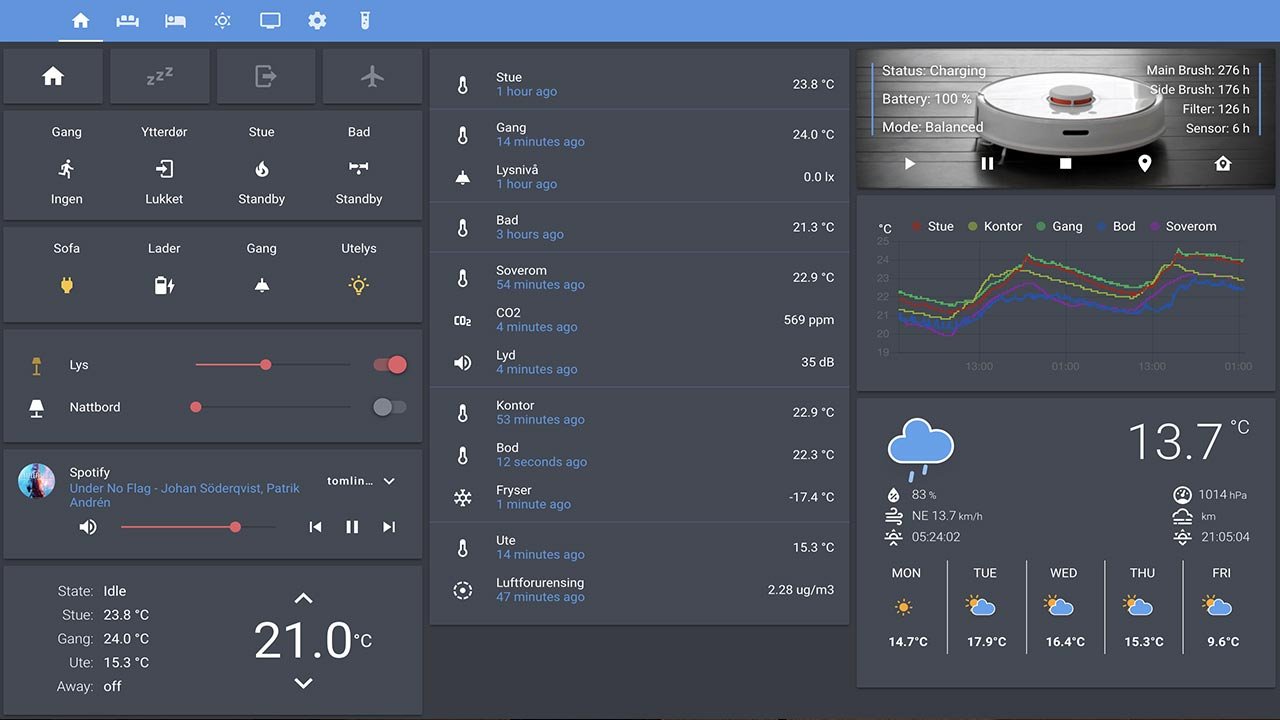
The Lovelace interface is Home Assistant’s dashboard system. It uses cards—such as entity cards, graph cards, map cards, and button cards—to create tailored views of your home:
- A simple “Home” view for daily control.
- Dedicated views for rooms, floors, or zones.
- Specialized views for energy, climate, or security.
Power users can edit Lovelace in YAML for fine-grained control, while others can rely on the visual UI editor.
Automation Engine and Scenes
Home Assistant’s automation engine is one of its biggest advantages over many mainstream platforms.
Automations
Automations typically follow a “trigger–conditions–actions” pattern:
- Triggers: Events such as motion detected, sunset, a specific time, a device turning on, or a state changing.
- Conditions: Optional checks such as “only if someone is home”, “only after sunset”, or “only if humidity is above 60%”.
- Actions: Commands like turning on lights, sending notifications, adjusting thermostats, or running scripts.
You can build automations with a visual editor or define them in YAML for version control and advanced logic. This flexibility makes Home Assistant suitable for both beginners and engineers.
Scenes and Scripts
Scenes and scripts provide reusable building blocks:
- Scenes capture a set of target states, like “Movie Night” with dimmed lights and a set media volume.
- Scripts define ordered actions that can be reused across automations, such as “shut down the house” when you leave.
Integrations and Protocols
Home Assistant’s integration layer is what makes it a true smart home hub rather than just another app. It supports thousands of integrations spanning:
- Lighting systems such as Philips Hue, LIFX, IKEA TRÅDFRI, and Zigbee-based bulbs.
- Switches, plugs, and relays from brands like Shelly, Sonoff, TP-Link, and many others.
- Climate systems including smart thermostats, heat pumps, and mini-split controllers.
- Security systems, smart locks, and door sensors.
- Media players and TVs, including Chromecast, Sonos, and many smart TV platforms.
- Energy monitoring devices, inverters, and smart meters.
- Voice assistants and local voice solutions.
Behind the scenes, Home Assistant can communicate using a wide range of protocols:
- Zigbee via built-in ZHA or external bridges like Zigbee2MQTT.
- Z-Wave for many legacy and current smart home devices.
- Matter and Thread for next-generation interoperable devices.
- MQTT for message-based IoT systems and DIY hardware.
- Wi-Fi and Ethernet for IP-based devices and cloud APIs where necessary.
- Bluetooth and Bluetooth Low Energy for short-range sensors and beacons.
In many homes, Home Assistant becomes the “translation layer” that lets devices from different vendors talk to each other as if they were part of one coherent platform.
Installation Options
One of Home Assistant’s strengths is deployment flexibility. You can choose an installation method that matches your skills, hardware, and reliability needs.
Home Assistant OS
This is the recommended “all-in-one” approach for most users. You flash a prebuilt image onto hardware such as:
- Raspberry Pi.
- Intel NUC or other small-form-factor PC.
- Supported single-board computers and appliances.
Home Assistant OS behaves like a dedicated appliance with automatic updates, add-on support, and integrated backups.
Home Assistant Container
Advanced users may prefer to run Home Assistant Core in Docker. This gives more control over the underlying system and is ideal when you already have a containerized environment or NAS.
Home Assistant Core (manual install)
For Linux, Python, and server enthusiasts, Core can be installed manually in a Python environment. This method offers maximum control but requires more ongoing maintenance.
Virtual Machines and Hypervisors
You can also deploy Home Assistant as a virtual machine on platforms like Proxmox, VMware, or VirtualBox. This is common in homes that already run a homelab or small server cluster.
Core Features and Capabilities
Home Assistant provides a broad feature set beyond basic “turn on a light” functionality.
Unified Device Control
Instead of using separate apps for each brand, you get a single interface where every controllable device appears as an entity. You can:
- Control devices individually or in groups.
- Create rooms, areas, and floors for logical organization.
- Expose only selected devices to voice assistants.
Powerful Automations and Logic
Home Assistant supports:
- Multi-condition automations based on time, device state, weather, location, and more.
- Templates for advanced logic, dynamic messages, or computed values.
- Scripts and scenes for reusing complex action sequences.
Dashboards and Wall Panels
You can design dashboards optimized for phones, tablets, or wall-mounted panels to monitor and control your home at a glance.
Notifications and Alerts
Home Assistant can send notifications via mobile push, email, messaging services, or speakers. You can configure alerts for water leaks, open doors, system failures, or unusual energy usage.
Energy Management
With support for power sensors, smart plugs, and inverters, Home Assistant can visualize energy consumption and solar production, helping you optimize when and how devices run.
Benefits of Home Assistant
From a technology management perspective, Home Assistant delivers several strategic benefits compared to closed ecosystems.
Local First, Cloud Optional
Because logic runs locally, automations remain fast and resilient even when your internet connection fails. You are not dependent on the uptime or business decisions of external vendors for core functionality.
Vendor Independence and Future-Proofing
Home Assistant abstracts devices behind a common entity model. If a vendor discontinues a product line or changes its cloud strategy, you can migrate to a different brand without rewriting your entire smart home.
Deep Customization
You are not restricted to predefined routines or narrow “if this, then that” logic. Advanced users can:
- Model occupancy based on multiple sensors.
- Implement energy-aware automations that track tariffs or solar production.
- Create complex security routines that adapt to time, presence, and system state.
Community-Driven Innovation
The open-source community often adds support for new devices or standards faster than proprietary platforms. Many niche or enthusiast devices only integrate officially or unofficially through Home Assistant.
Cost Efficiency Over Time
The software itself is free. While there is hardware cost, running a single local hub can be more cost-effective over the long term than maintaining multiple brand-specific hubs and subscriptions.
Common Use Cases
Home Assistant is flexible enough to power everything from simple convenience automations to robust whole-house management.
Smart Lighting
Examples include:
- Automatically turning on hallway and bathroom lights at night with low brightness.
- Using occupancy sensors so lights follow people through the house.
- Creating dynamic scenes based on time, weather, or TV activity.
Climate and Comfort
Home Assistant can:
- Adjust thermostats based on presence, time of day, and window states.
- Control blinds or shades to reduce cooling costs.
- Run ceiling fans or air purifiers when indoor air quality drops.
Security and Safety
With sensors and cameras integrated, you can:
- Arm or disarm alarm logic based on presence or bedtime routines.
- Receive instant alerts when doors or windows open unexpectedly.
- Log events and capture snapshots during motion or alarm triggers.
- Detect leaks and shut off water using motorized valves.
Energy and Load Management
Energy-focused automations might:
- Shift heavy loads like EV charging or laundry to off-peak times.
- Throttle electric heating or AC when energy prices spike.
- Coordinate battery storage and solar production to optimize self-consumption.
Voice and Natural Interaction
You can:
- Expose selected devices and scenes to commercial voice assistants.
- Experiment with local voice stacks to keep spoken commands in your home.
- Use announcements through speakers as part of automations, such as reminders or alerts.
Privacy and Security Model
Home Assistant is architected with privacy in mind. Because the system runs on your own hardware inside your network:
- Device states and historical data are stored locally by default.
- You choose whether to expose services outside your network.
- Remote access can be set up via secure tunnels, VPNs, or the official cloud service, depending on your risk tolerance.
From a security management standpoint, best practices include:
- Keeping Home Assistant and add-ons updated.
- Using strong, unique passwords and enabling multi-factor authentication for user accounts.
- Segmenting IoT devices on separate network VLANs where possible.
- Restricting port forwarding and relying on secure, audited remote access methods.
This approach lets organizations and privacy-focused homeowners enjoy the benefits of automation without surrendering all data to external providers.
Home Assistant vs. Commercial Platforms
Commercial platforms such as Amazon Alexa, Google Home, and Apple Home are typically optimized for ease of onboarding and consumer mass adoption. Home Assistant instead optimizes for control, flexibility, and depth.
Home Assistant vs. Amazon Alexa
- Alexa is voice-first and cloud-dependent. Most logic runs on Amazon’s servers.
- Home Assistant is automation-first and local-first. Voice is one interaction channel among many.
- Alexa skills and integrations are limited by Amazon’s platform rules, whereas Home Assistant can integrate with niche and DIY devices more easily.
Home Assistant vs. Google Home
- Google Home focuses on simplicity and AI-driven suggestions but offers limited advanced logic.
- Home Assistant supports arbitrarily complex automations and can integrate external data sources such as APIs, sensors, or custom scripts.
Home Assistant vs. Apple Home
- Apple Home emphasizes privacy and security but historically supports a narrower ecosystem of devices.
- Home Assistant offers similar privacy benefits when self-hosted, with much broader device compatibility and integration flexibility.
For many users, the ideal architecture is hybrid: Home Assistant as the automation brain, with optional bridges to commercial platforms for convenient voice control and mobile access.
Who Should Use Home Assistant?
Home Assistant is well suited for:
- Tech-savvy homeowners who want deep control over their smart home.
- Professionals and consultants building robust automation solutions for clients.
- Hobbyists and makers integrating DIY hardware or unconventional devices.
- Privacy-conscious users wary of sending detailed behavior data to cloud providers.
It may be less ideal for users who:
- Prefer not to deal with any self-hosted systems.
- Are comfortable staying within one brand’s ecosystem and accept vendor lock-in.
- Have no interest in exploring or tuning automations beyond the basics.
That said, the platform has become significantly more user-friendly over time. Visual editors, installation wizards, and ready-made blueprints mean you no longer need to be a programmer to benefit from Home Assistant.
Top 5 Frequently Asked Questions
Final Thoughts
The most important takeaway about Home Assistant is that it transforms the smart home from a loose collection of brand-specific gadgets into a cohesive, locally controlled system that you truly own. Instead of outsourcing critical automation logic and data to external clouds, you run the intelligence in your own environment, where it can be faster, more reliable, and more private.
From an innovation and technology management perspective, Home Assistant is a strategic platform choice. It reduces dependency on any single vendor, gives you latitude to experiment with new devices and standards, and lets you continuously iterate your automations as your home and lifestyle evolve. If your goal is a smart home that is not just “connected” but genuinely orchestrated, Home Assistant provides the control plane to make that happen on your terms.




Leave A Comment