


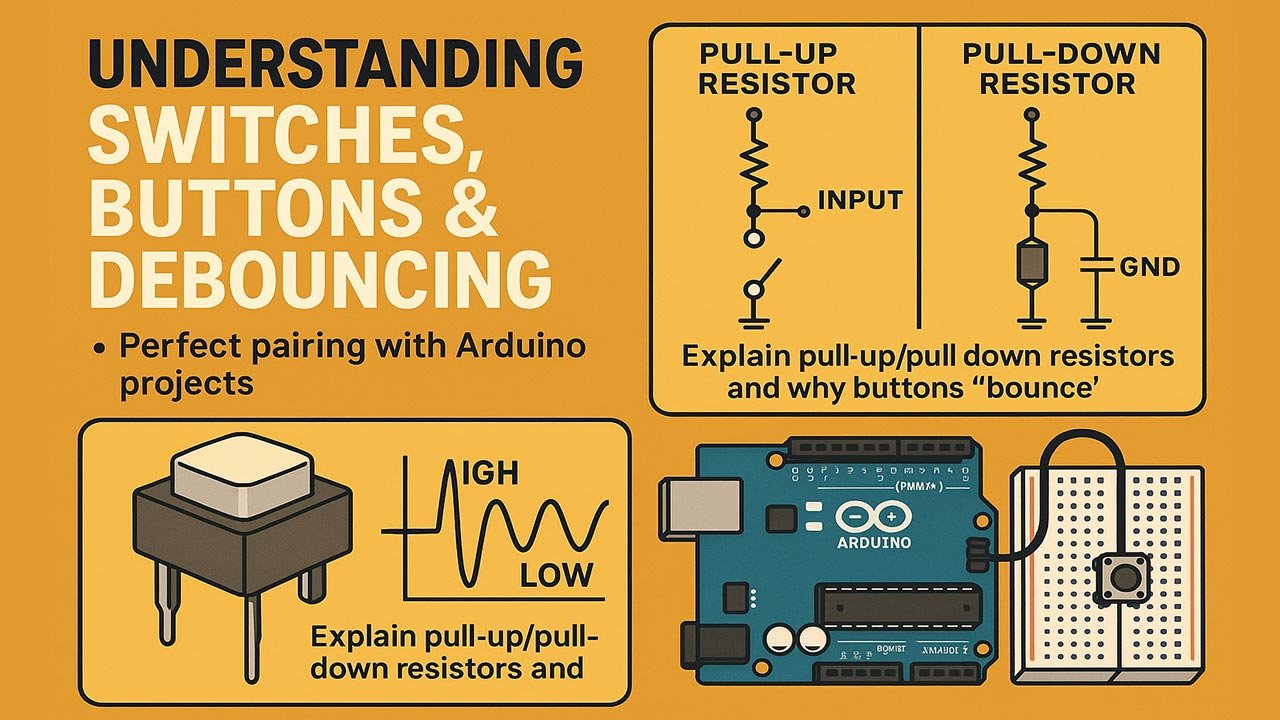
Understanding Switches & Button Debouncing: The Perfect Pairing With Arduino Projects
Switches and buttons look deceptively simple, yet they remain one of the most common sources of failure in Arduino projects. This article explains how switches and buttons actually behave at an electrical level, why debouncing is essential for reliable interaction, and how mastering these fundamentals leads to more robust, scalable, and professional-grade Arduino systems.
Table of Contents
- What Are Switches and Buttons?
- Types of Switches Used in Arduino Projects
- How Arduino Reads Button Inputs
- The Hidden Problem: Contact Bounce
- What Is Debouncing?
- Hardware Debouncing Techniques
- Software Debouncing Techniques
- Best Practices for Arduino Input Design
- Real-World Applications and Design Impact
- Top 5 Frequently Asked Questions
- Final Thoughts
- Resources
What Are Switches and Buttons?
At their core, switches and buttons are electromechanical interfaces that control the flow of electrical current. In Arduino systems, they act as human–machine interfaces, translating physical actions into digital signals the microcontroller can interpret.
A switch maintains its state until acted upon again, while a button is typically momentary, changing state only while being pressed. Despite their simplicity, both rely on physical metal contacts, springs, and mechanical movement, which introduces imperfections that software must account for.
From an innovation management standpoint, these components represent a critical boundary between human intent and digital execution. Poor input design can compromise reliability, user experience, and even system safety.
Types of Switches Used in Arduino Projects
Arduino projects commonly use several switch and button types, each suited to different design goals.
Momentary push buttons are the most common. They close a circuit only while pressed and are ideal for user commands such as start, stop, or reset.
Toggle switches maintain their position and state, making them useful for power selection, mode switching, or feature enabling.
Slide switches offer compact form factors and are frequently used in portable devices.
Limit switches detect physical movement and are widely used in robotics and automation systems.
Capacitive touch switches replace mechanical contacts altogether, eliminating bounce but introducing sensitivity and environmental considerations.
Choosing the correct switch type is not just a hardware decision. It directly affects software logic, user expectations, and system scalability.
How Arduino Reads Button Inputs
Arduino reads buttons as digital signals through GPIO pins. Each pin detects either a HIGH or LOW voltage, typically representing pressed or released states.
Using pull-up or pull-down resistors ensures the pin has a defined voltage when the button is not engaged. Arduino boards provide internal pull-up resistors, simplifying circuit design and improving reliability.
However, Arduino reads inputs at high speed. A single press can be sampled thousands of times per second, which becomes problematic when the signal is unstable.
This rapid sampling exposes the physical limitations of mechanical switches and leads directly to the phenomenon known as contact bounce.
The Hidden Problem: Contact Bounce
Contact bounce occurs when metal contacts inside a switch physically vibrate as they close or open. Instead of a clean transition from LOW to HIGH, the signal oscillates rapidly for a few milliseconds.
To a human, this bounce is imperceptible. To a microcontroller running millions of instructions per second, it looks like multiple presses.
Studies show that bounce durations typically range from 1 to 50 milliseconds depending on switch quality, materials, and environmental conditions. In high-speed systems, this can generate dozens of false triggers from a single press.
Ignoring bounce leads to unpredictable behavior, duplicated inputs, and system instability. In professional engineering environments, unfiltered mechanical inputs are considered unacceptable.
What Is Debouncing?
Debouncing is the process of filtering out unintended signal transitions caused by contact bounce. The goal is to ensure that each physical action produces exactly one logical event.
Debouncing can be implemented in hardware, software, or a combination of both. The optimal approach depends on system constraints, cost targets, and reliability requirements.
From a technology management perspective, debouncing is a classic example of trading hardware simplicity for software complexity, or vice versa.
Hardware Debouncing Techniques
Hardware debouncing uses physical components to smooth the signal before it reaches the microcontroller.
The most common method uses an RC (resistor-capacitor) network. The capacitor absorbs rapid voltage changes, while the resistor controls discharge time. This effectively filters high-frequency bounce noise.
Schmitt trigger buffers further clean signals by introducing hysteresis, ensuring clean transitions even with slow or noisy inputs.
Hardware debouncing offers immediate signal stability and reduces CPU load. However, it increases component count, board space, and cost.
In mass-produced products, hardware debouncing is often preferred for mission-critical inputs due to its predictability and independence from firmware execution timing.
Software Debouncing Techniques
Software debouncing relies on timing logic within the Arduino code.
The simplest method uses a delay after detecting a state change, ignoring further changes during the debounce window. While easy to implement, this approach blocks execution and reduces responsiveness.
More advanced techniques use non-blocking timers with millis(), tracking how long the input has remained stable before accepting it as valid.
State-machine-based debouncing offers the highest reliability and scalability, especially when handling multiple inputs simultaneously.
Software debouncing is flexible and cost-effective but requires disciplined coding practices and thorough testing.
Best Practices for Arduino Input Design
Reliable Arduino input systems follow a few proven principles.
Always define input states explicitly using pull-up or pull-down resistors.
Never assume a button press equals a single event without debouncing.
Avoid blocking delays in production code, especially in systems with multiple inputs or real-time requirements.
Abstract input handling into functions or classes to improve maintainability.
Test inputs under real-world conditions, including vibration, temperature variation, and user behavior.
From an innovation standpoint, these practices reduce technical debt and make prototypes easier to evolve into production-ready systems.
Real-World Applications and Design Impact
In robotics, improper debouncing can cause erratic movement or unsafe behavior.
In IoT devices, false inputs can trigger unintended network traffic or energy waste.
In industrial control systems, unfiltered mechanical inputs can lead to costly downtime or safety incidents.
Mastering switches, buttons, and debouncing elevates Arduino projects from hobby-grade experiments to professional engineering solutions. It also reinforces a core lesson of innovation management: small details often determine system success.
Top 5 Frequently Asked Questions
Final Thoughts
Switches and buttons may be simple components, but they sit at the heart of human–machine interaction. Understanding their physical behavior and implementing proper debouncing transforms unreliable inputs into deterministic system events. For Arduino developers aiming to scale projects beyond experimentation, debouncing is not optional—it is foundational engineering discipline.
Resources
- Arduino Official Documentation – Digital Inputs
- Jack Ganssle, “A Guide to Debouncing”
- Horowitz & Hill, The Art of Electronics
- Microchip Application Notes on Mechanical Switches



Leave A Comment