


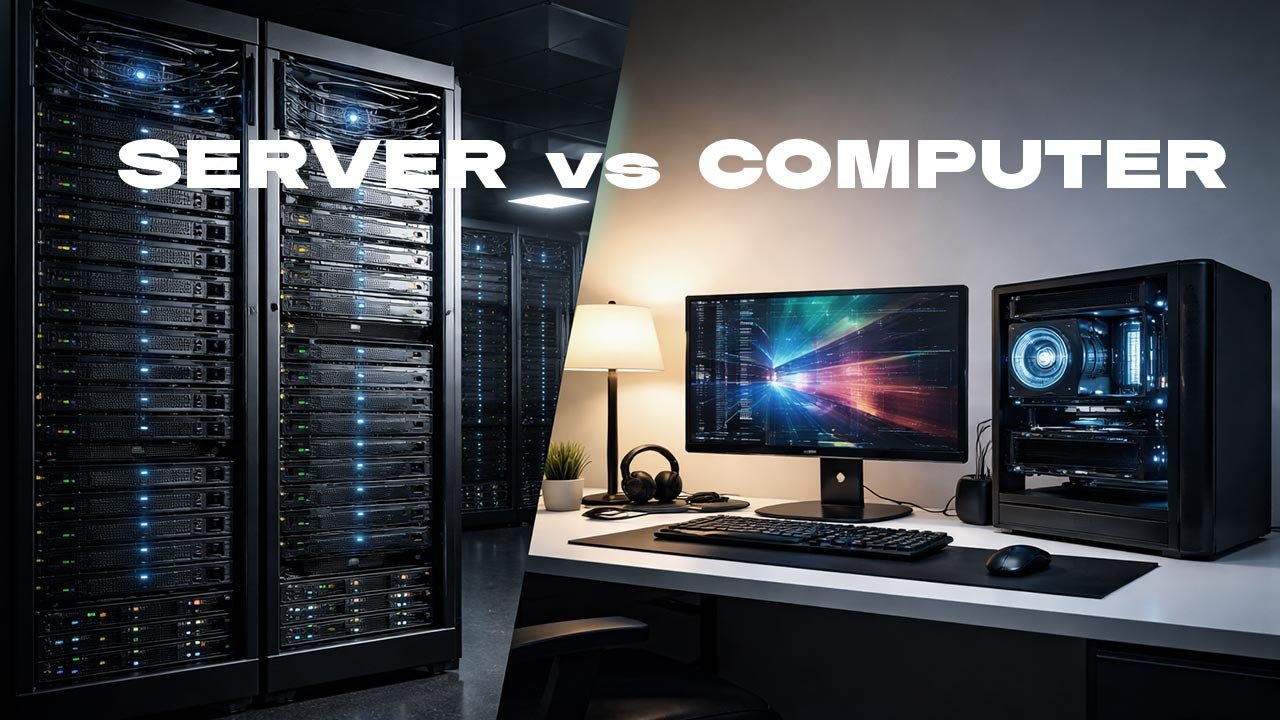
What Is the Difference Between a Server and a Regular Computer?
Servers and regular computers may look similar on the surface, but they are designed for very different purposes. Understanding these differences is critical for businesses, IT professionals, and decision-makers planning infrastructure investments. We will explain how servers differ from everyday computers in function, design, performance, cost, and use cases.
Table of Contents
- Definition and Core Purpose
- Hardware Architecture Differences
- Performance and Reliability
- Software and Operating Systems
- Security and Access Control
- Scalability and Workload Management
- Cost and Total Cost of Ownership
- Typical Use Cases
- Frequently Asked Questions
- Final Thoughts
- Resources
A regular computer is designed for individual productivity. A server is designed to serve many users or systems at the same time. That single distinction explains nearly every technical and architectural difference between the two.
Definition and Core Purpose
A regular computer, often called a personal computer or workstation, is built for direct human interaction. It runs applications such as web browsers, office software, design tools, or games. It assumes one primary user at a time. A server is a system built to provide services to other computers, applications, or users over a network. These services can include hosting websites, managing databases, storing files, authenticating users, or running enterprise applications. Servers are designed to operate continuously and respond to many simultaneous requests. The difference is not cosmetic. It is architectural and intentional.
Hardware Architecture Differences
Servers and regular computers use similar components, but they are engineered to different standards. Servers typically use enterprise-grade processors designed for sustained workloads. These CPUs often have higher core counts and support advanced features such as error correction and virtualization extensions. Memory is another major difference. Servers almost always use ECC (Error-Correcting Code) RAM. This memory detects and corrects data corruption in real time, reducing the risk of crashes or silent data errors. Regular computers usually use non-ECC memory, which is faster and cheaper but less reliable under heavy load. Storage systems also differ. Servers commonly use RAID configurations with multiple drives to ensure redundancy and fault tolerance. If one drive fails, the system continues running. Regular computers usually rely on a single drive, sometimes with a secondary backup. Power supplies in servers are often redundant. If one power unit fails, another takes over instantly. A regular computer shuts down when its power supply fails.
Performance and Reliability
Servers are designed for uptime. Many enterprise servers target 99.9% or higher availability, meaning minutes of downtime per year. They are optimized for consistent performance over long periods, not short bursts of speed. Regular computers prioritize responsiveness for interactive tasks. They perform well for short sessions but are not designed to run at full capacity around the clock. Cooling systems reflect this difference. Servers use high-efficiency cooling to manage constant heat output. Regular computers rely on simpler cooling designed for intermittent use. Reliability is not optional in server environments. A failure can disrupt hundreds or thousands of users, halt operations, or cause data loss.
Software and Operating Systems
Servers typically run specialized operating systems configured for stability, security, and network services. These systems are optimized to manage resources across many users and applications simultaneously. Server software emphasizes background services rather than graphical interfaces. Many servers operate without a monitor, keyboard, or mouse after initial setup. Regular computers run operating systems optimized for user interaction. They focus on ease of use, visual interfaces, and compatibility with consumer software. The software ecosystem reflects the hardware intent. Server applications handle authentication, databases, virtualization, and traffic routing. Desktop applications focus on productivity and creativity.
Security and Access Control
Security is foundational in server design. Servers are often exposed to internal networks or the internet, making them high-value targets. Servers implement strict access controls, role-based permissions, and audit logging. Administrators can track who accessed what, when, and from where. Regular computers rely more heavily on user discretion and endpoint security tools. While they can be secured, they are not inherently designed for multi-user access or centralized control. In enterprise environments, servers often integrate with identity management systems, encryption protocols, and intrusion detection tools.
Scalability and Workload Management
Servers are built to scale. This can mean adding more memory, processors, or storage to a single machine, or distributing workloads across multiple servers. Virtualization and containerization technologies allow servers to run many isolated environments on the same hardware. This maximizes resource utilization and simplifies deployment. Regular computers scale poorly. Their architecture assumes a fixed workload and limited expansion. This scalability is why servers form the backbone of cloud computing and enterprise IT infrastructure.
Cost and Total Cost of Ownership
Servers cost more upfront. Enterprise hardware, redundancy, and support contracts increase initial investment. However, cost must be evaluated over time. Servers are designed for long lifecycles, predictable performance, and centralized management. This reduces downtime, labor costs, and operational risk. Regular computers are cheaper to purchase but expensive to scale. Managing many individual machines quickly becomes inefficient. In business environments, servers often provide a lower total cost of ownership when supporting multiple users or applications.
Typical Use Cases
Regular computers are ideal for individual tasks such as document creation, design, development, and personal use. Servers are used for hosting websites, running databases, managing email systems, supporting enterprise applications, storing shared files, and enabling remote access. In modern environments, the line can blur through virtualization and cloud services, but the underlying design principles remain distinct.
Top 5 Frequently Asked Questions
Final Thoughts
The most important takeaway is intent. A regular computer is built for one user and interactive tasks. A server is built to serve many users, applications, or systems reliably and securely over time. Choosing between a server and a regular computer is not about speed or appearance. It is about workload, reliability, scalability, and risk. Understanding this difference helps organizations build infrastructure that supports growth instead of limiting it.
Resources
- Uptime Institute – Data Center Reliability Research
- National Institute of Standards and Technology – Computer System Architecture Publications
- Intel Enterprise Server Architecture Documentation
- VMware Infrastructure and Virtualization Whitepapers





Leave A Comment